
- Insights
Detection Tells You What's There. Behavior Tells You What's Happening.
A camera at the edge of a campus parking lot sees a person at 2 PM, walking up to a car, getting in and driving away. At 2 AM it sees a person again, this time hunched beside a car, glancing over a shoulder between each door handle. To a detection model, those are the same event: person found, alert sent.
The gap runs the other way too. Later that week, someone slips on the stairs of the parking garage and stays on the ground. The camera sees a person, exactly as it did for everyone who walked past an hour earlier. A system that understands behavior sees a person who stopped moving and hasn't gotten up, and that is an alert that sends help, not just a notification.
That gap, between knowing what is in the frame and knowing what is going on, is the difference between object detection and behavioral analysis. Most sites have the first. Far fewer have the second.
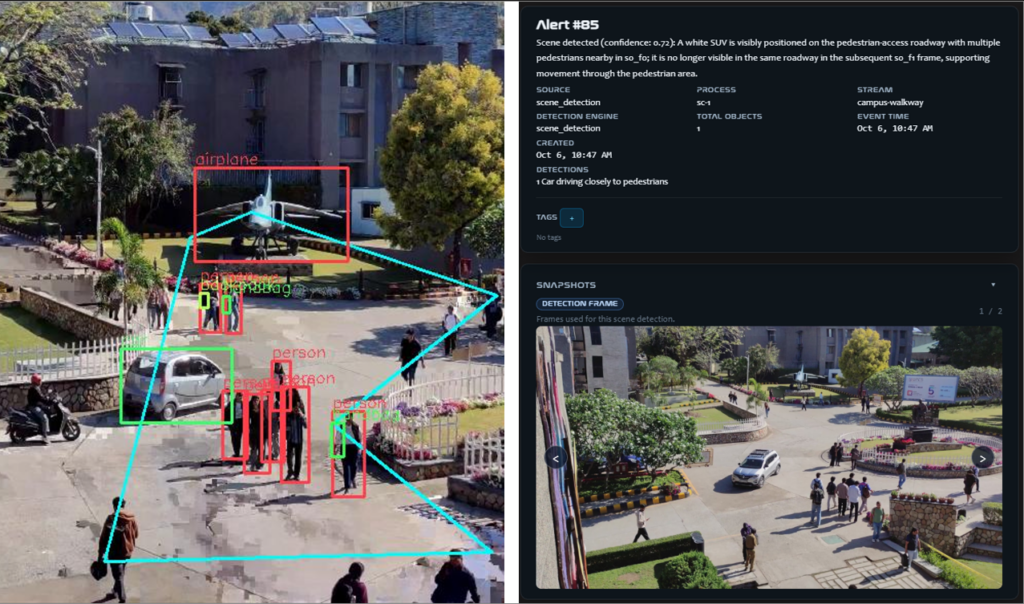
What detection does well
Object detection answers the question: what is in this frame? Person, vehicle, animal. It's mature, widely available and useful. It turns hours of recorded video into searchable events, and it's the foundation everything else in video analytics is built on, behavioral analysis included.
Where the scene is simple and the rule is absolute, detection alone can be enough. A fenced equipment yard that nobody should ever enter can run on "person detected, send alert." That makes sense and no one questions it.
Where detection isn't so great
The trouble starts when the same object means different things at different times and places. The times and places where context and intent is critical.
It has no sense of place. A car in a parking space is fine. The same car sitting in a fire lane is not. Detection reports "vehicle" either way.
It has no sense of pattern. One pass by a door is nothing. The fourth pass is something. Detection treats each pass as a separate, unrelated event.
It produces volume, not judgment. Every person and every car becomes an alert. Operators learn which alerts to skip, and eventually they skip most of them.
What behavioral analysis adds
Behavioral analysis starts with detection, then asks what the detected person, vehicle, or other object is doing: where, for how long, at what hour, and whether that's normal for that spot. In TitanOps, that comes down to four things.
- Time. Alert rules follow the site's schedule. Presence in a building after hours can trigger an alert; the same presence during class changes or a shift change doesn't.
- Place. Rules are configured per area. A loading dock, a fire lane, a stadium gate and a lobby each get settings that fit how they're actually used.
- Pattern. TitanOps looks at movement over time rather than single frames: loitering, vehicle dwell, crowd build-up, wrong-way movement through an entrance or exit.
- Fewer, better alerts. Because the rule carries context, the alert does too. Operators see what happened, where and for how long, instead of another "person detected."
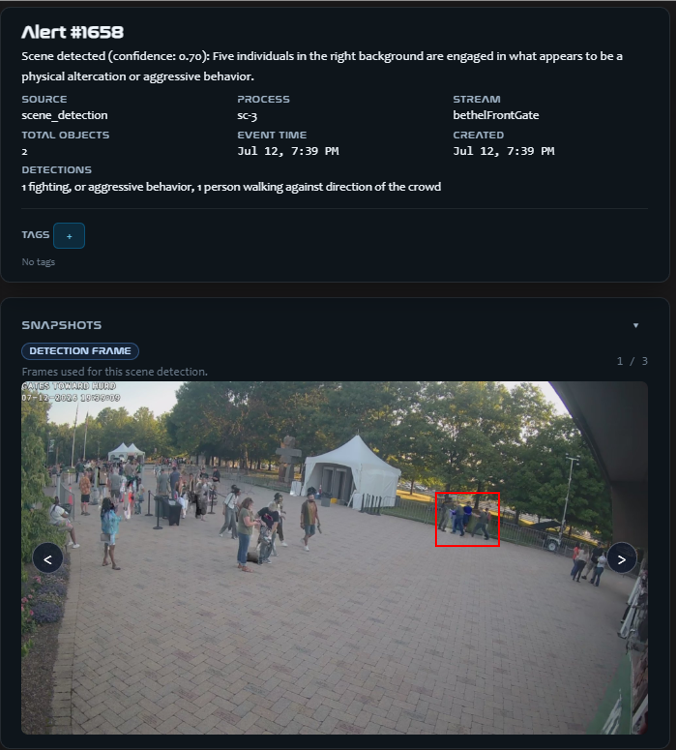
Here is the difference in practice. Instead of being alerted that people are at a gate and then watching the feed to see whether anything happens, the operator gets the alert for what happened: a fight. The same is true of any behavior TitanOps is configured or trained to look for.
| Object detection | Behavioral analysis | |
|---|---|---|
| Question it answers | What is in the frame? | What is happening, and does it matter here, now? |
| What it looks at | The object | The object plus time, location and movement |
| Example output | "Person detected" | "Person lingering at the loading dock after hours" |
| Knows the schedule | Sometimes | Yes, rules by hour and day |
| Knows the area | Limited | Configured per zone |
| Alert volume on busy scenes | High | Filtered to behavior that matters |
| Best fit | Simple, absolute rules; after-the-fact search | Busy, mixed-use sites; after hours; crowds |
Basic vs. custom-trained behaviors
Basic behaviors cover the patterns most sites share: loitering, perimeter and after-hours intrusion, crowd density, wrong-way movement, vehicles dwelling in fire lanes and unattended objects. They're configured, not built. You pick the area, set the schedule, and decide who gets the alert.
Custom-trained behaviors are for patterns specific to one site: something that matters at your venue, campus or facility and nowhere else.
If the basics cover what you need, you don't need custom training. We'd rather tell you that up front.
Who it's for
Detection alone is probably enough if you run a small site with a few cameras and minimal activity, your rules are absolute ("no one in this area, ever"), and footage is mostly reviewed after the fact.
Behavioral analysis is worth a look if you:
- Get more alerts than your team can meaningfully review
- Run a site whose "normal" changes by the hour, such as a campus, venue or municipal lot
- Need to see a situation building, like a crowd at an entrance or someone lingering, before it becomes an incident
- Watch fire lanes, loading docks or perimeters after hours
- Have a pattern unique to your site that no standard rule covers
The bottom line
Detection tells you a person is there. Behavior tells you whether you should care. Both matter, but only one of them cuts the alert queue down to what your team actually needs to see.
See it on your own scenes. Pick a scene that gives your team trouble, whether a parking lot, a loading dock or a crowded entrance, and Vigilare AI will show you what behavioral analysis would flag there that detection alone misses. Contact us to ask for a scene-specific demo.